> For the complete documentation index, see [llms.txt](https://docs.b2bridge.io/llms.txt). Markdown versions of documentation pages are available by appending `.md` to page URLs; this page is available as [Markdown](https://docs.b2bridge.io/app-configuration/b2b-registration-form/how-to-put-registration-form-on-your-storefront.md).
# How to put registration form on your storefront
**Step 1**: Go to Registration Form > Click on the eye/ preview button on the form you want to display
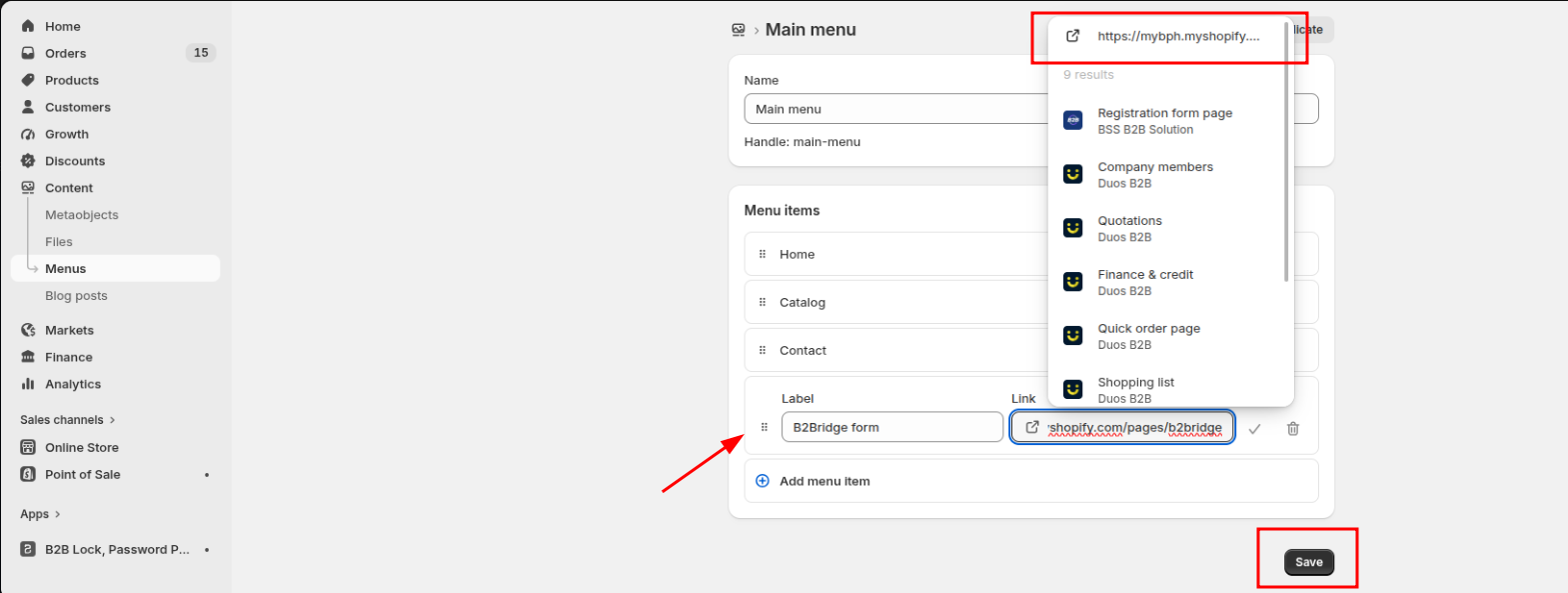
**Step 2**: Go to Contents > Menu within Shopify Admin and click on Main menu if you want to put the form on the header. \
\
If you want to put the form in your footer, choose Footer menu.
**Step 3**: Click Add menu item.
**Step 4**: Add label and links. Once you paste the link in the link box, you should see the option to click on the link.\
\
Finally, hit Save to keep the change.
{% hint style="success" %}
### Need Help?
If you have questions or run into issues while using any feature, we're here to help.
* 💬 **Start a** [**Live Chat** with our support team](https://go.crisp.chat/chat/embed/?website_id=a59f354c-f51f-4f84-ae9a-c0e8dd69d2e5) directly from your B2Bridge dashboard.
* 📧 **Email us at** [**support@b2bridge.io**](mailto:support@b2bridge.io) and we'll get back to you as soon as possible.
{% endhint %}